CRD Cab Fare Calculator: WordPress Plugin Documentation
Developed by: Car Rental Delhi with Driver
License: GPL-2.0-or-later
Overview
CRD Cab Fare Calculator is a lightweight WordPress plugin that allows website owners to display an interactive cab and taxi fare calculator on their websites. The plugin is designed for taxi operators, car rental companies, chauffeur services, travel agencies, and transportation businesses that want to provide visitors with instant estimated trip fares.
Website administrators can configure vehicle categories, per-kilometre rates, minimum fares, and currency symbols from the WordPress dashboard. The calculator works directly on the website without requiring Google Maps API keys, external services, or third-party integrations.
Key Features
- Simple and responsive frontend fare calculator.
- One-way and round-trip fare calculations.
- Three configurable vehicle categories: Hatchback, Sedan, and SUV.
- Customizable per-kilometre pricing.
- Configurable minimum fare.
- Custom currency symbol.
- Easy integration using a WordPress shortcode.
- Simple administration settings.
- No external API or registration requirements.
- Lightweight implementation.
Installation
Follow these steps to install the plugin:
- Download the CRD Cab Fare Calculator plugin ZIP file from wordpress plugin directory.
- Log in to your WordPress administration dashboard.
- Navigate to Plugins → Add New Plugin.
- Select Upload Plugin.
- Upload the plugin ZIP file.
- Click Install Now.
- Activate the plugin.
Once activated, the Cab Fare Calculator menu will become available in your WordPress administration dashboard.
Plugin Configuration
Navigate to: WordPress Dashboard → Cab Fare Calculator
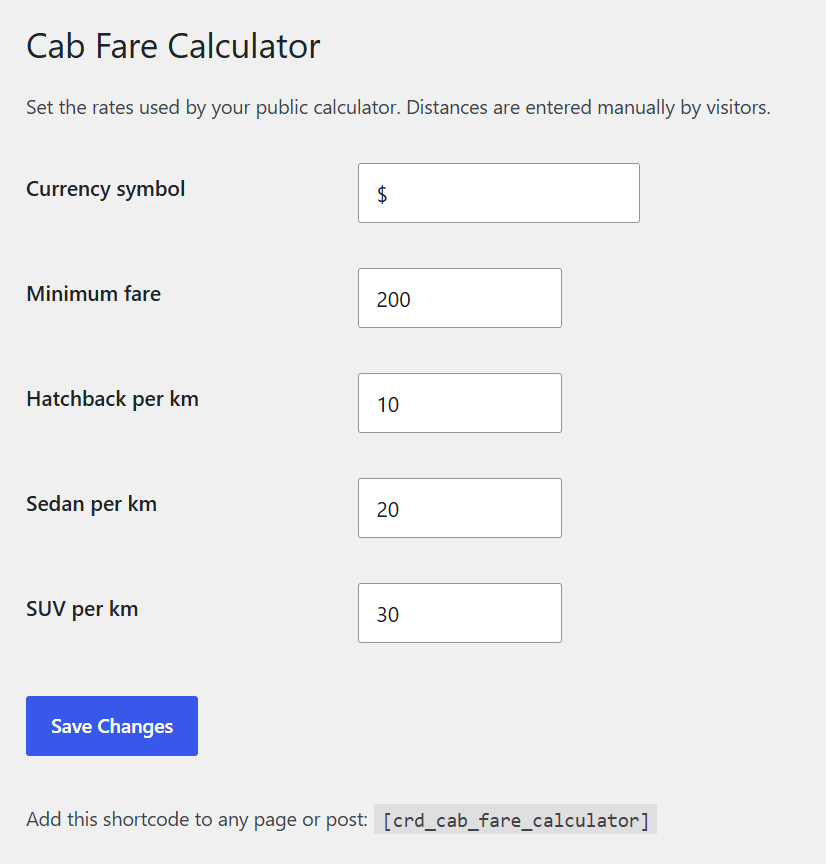
The settings page allows administrators to configure the calculator.
1. Vehicle Rates
Set the per-kilometre fare for each vehicle category:
These rates are used to calculate estimated trip fares.
2. Minimum Fare
Set a minimum fare amount for trips.
If the calculated distance-based fare is lower than the configured minimum fare, the minimum fare is applied.
3. Currency Symbol
Configure the currency symbol displayed in the calculator results.
For example:
- ₹ – Indian Rupee
- $ – US Dollar
- € – Euro
- £ – British Pound
The calculator uses the configured symbol when displaying the estimated fare.
Remember to save your settings after making changes.
Adding the Calculator to a Website
The plugin uses a shortcode to display the fare calculator.
Use the following shortcode:
[crdc_cab_fare_calculator]
How to add the shortcode
- Open the WordPress page or post where you want the calculator to appear.
- Add a Shortcode block in the WordPress editor.
- Paste
[crdc_cab_fare_calculator] into the block.
- Publish or update the page.
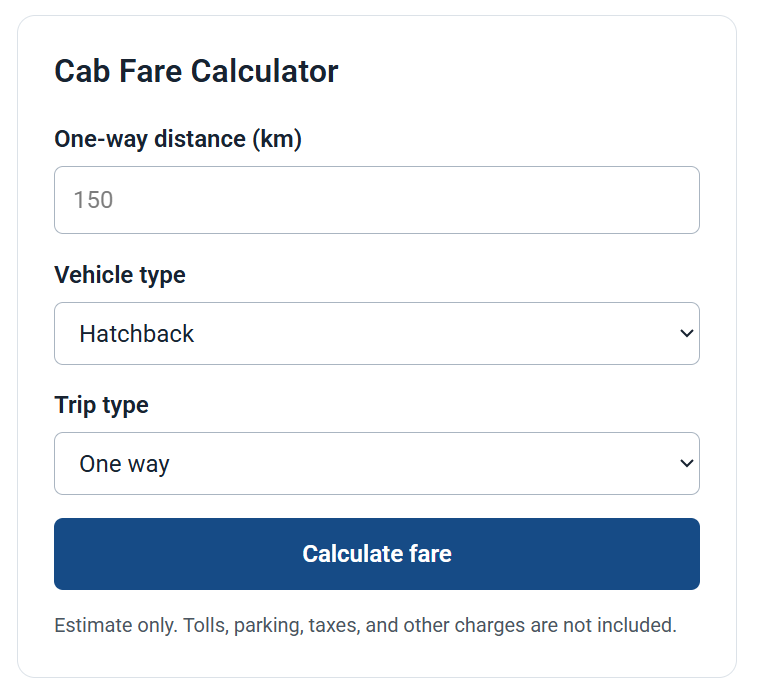
The calculator will automatically appear on the frontend.
You can also use the shortcode in supported page builders and other shortcode-compatible areas.
How Fare Calculation Works
The calculator uses the configured vehicle rate and the distance entered by the visitor.
One-way calculation:
Estimated Fare = Distance × Vehicle Rate
Round-trip calculation:
Estimated Fare = (Distance × 2) × Vehicle Rate
Minimum fare application:
If the calculated fare is lower than the configured minimum fare, the minimum fare is displayed instead.
Example
Suppose the administrator configures:
- Vehicle: Sedan
- Rate: ₹13 per kilometre
- Distance: 150 km
- Minimum fare: ₹300
For a one-way trip:
150 × ₹13 = ₹1,950
For a round-trip journey:
300 × ₹13 = ₹3,900
These are illustrative examples. Actual estimates depend on the rates configured by the website administrator.
Important Notes
- Visitors must enter the trip distance manually.
- The plugin does not automatically calculate road distance between pickup and drop-off locations.
- Google Maps integration is not required.
- The displayed amount is an estimated fare based on administrator-configured rates.
- Additional charges such as tolls, parking, taxes, or driver allowances are not automatically calculated by the basic calculator.
- The plugin does not process bookings or payments.
- The plugin does not require visitors to create an account.
Frequently Asked Questions
Can I have a live plugin demo?
Sure, please visit https://carrentaldelhi.com/cab-fare-calculator/
Does the plugin require a Google Maps API key?
No. The calculator uses manually entered trip distances and does not require Google Maps or any other external API.
Can I change vehicle prices?
Yes. Administrators can configure the per-kilometre rates for Hatchback, Sedan, and SUV vehicles from the plugin settings.
Can I use a different currency?
Yes. You can configure the currency symbol from the administration settings.
Can I display the calculator on multiple pages?
Yes. Use the plugin shortcode on any number of pages or posts where WordPress shortcodes are supported.
Does the plugin support round trips?
Yes. Visitors can select one-way or round-trip travel when calculating estimated fares.
Does the plugin collect visitor information?
The basic calculator does not require visitor registration or collect personal information to calculate fares.
Is the plugin free?
Yes. CRD Cab Fare Calculator is distributed under the GPL-2.0-or-later license. You can download it from WordPress plugin directory.
Support and Contact
For plugin-related questions, technical assistance, or feedback, please email us at bobbythakur@carrentaldelhi.com
Thank you for using CRD Cab Fare Calculator.